First downloadable Hub release

Hub is here.
Keep the workflow local.

ByteCase Hub 0.29.0 is available as a signed Windows pilot. Review saved cases before activation, then request an offline license to create and change case work.

Downloadable Windows pilot

Start with ByteCase Hub.

Read the activation overview →
Pilot Release

Case and Module Orchestration

ByteCase Hub

Separate workflow utilities still require examiners to locate cases, reopen tools, and remember which outputs already exist.

  • Search and open local ByteCase case work without browsing folders manually
  • View the active case, workflow stage, module record counts, warnings, and missing records
  • Use Intake, Acquire, and Verify inside one case workspace after activation
  • Review saved case work and save supported PDF or DOCX copies before activation

Second-monitor workflow

Built for the second monitor.

Capture the record while the work is still in context.

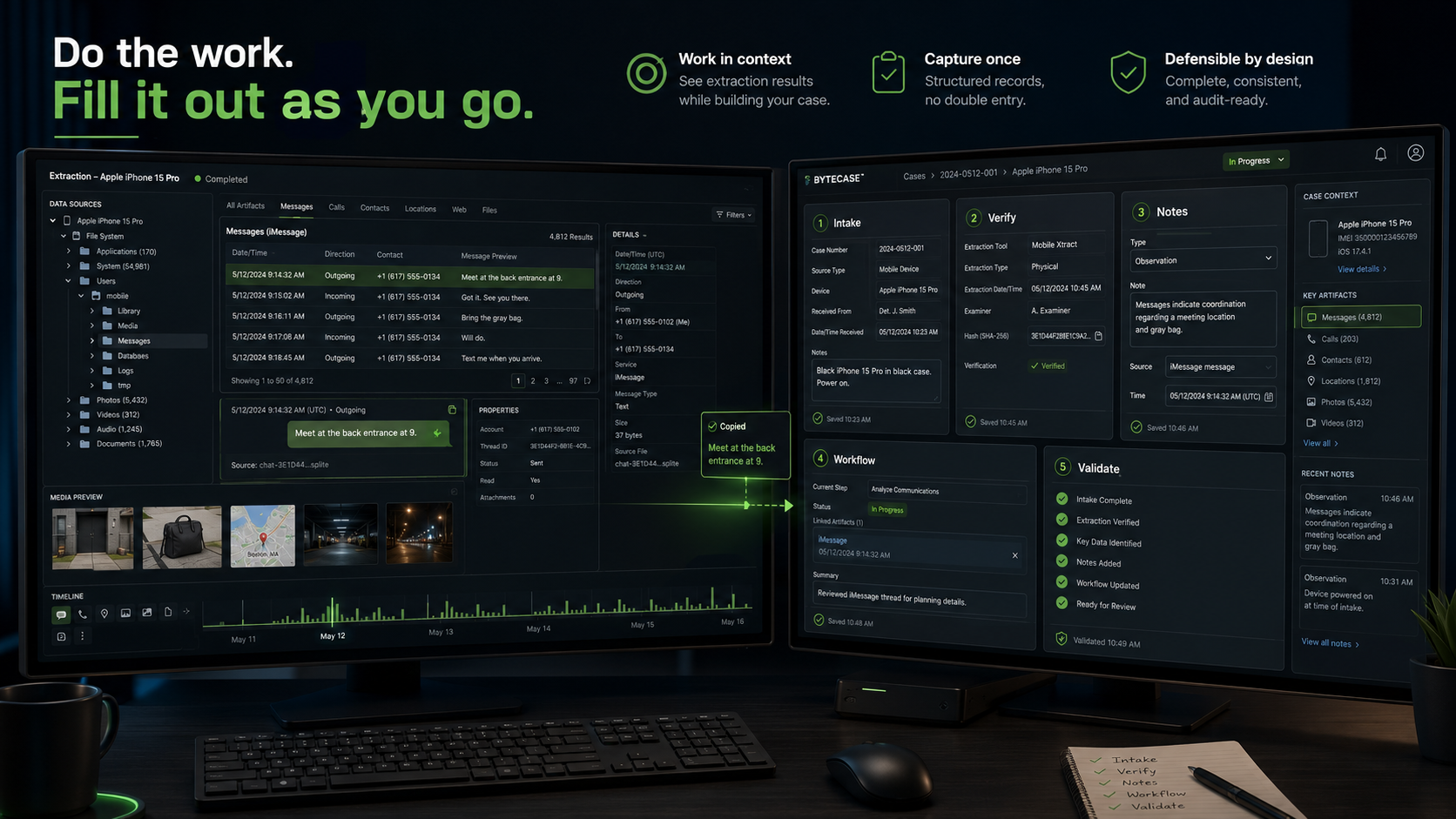
ByteCase is designed to sit beside the forensic tools examiners already use. Keep the extraction, analysis, or review platform open on the primary monitor, then use ByteCase on the second monitor to document the work as it happens.

Dual-monitor digital forensics workstation with an extraction and analysis platform on the left monitor and ByteCase workflow documentation tools on the right monitor.
Review the extraction or analysis on one screen while capturing structured intake, verification, notes, workflow, and validation records on the other. This illustration shows the broader companion-workspace concept. The Hub pilot page shows the current interface and release scope; Notes and the Hub Report screens remain deferred.
01

Work in context

Keep the source information visible while recording the applicable details. Copy identifiers, timestamps, tool information, and observations directly from the examination instead of reconstructing them later.

02

Capture once

Enter the record when the work occurs. ByteCase modules are intended to preserve reusable local records instead of forcing the examiner to repeat the same information across temporary notes and final reports.

03

Preserve momentum

ByteCase complements the primary forensic platform without interrupting extraction or analysis. Open the module needed for the current task, save the record, and continue the examination.

How ByteCase fits

A companion workspace, not another analysis platform.

ByteCase does not perform the extraction, parse the evidence, or decide what an artifact means. It helps preserve the request, acquisition details, integrity checks, examiner-authored observations, validation history, and workflow status surrounding the technical work.

See how ByteCase runs →

Modular adoption

Start with one workflow problem. Keep the rest compatible.

Each prepared tool can be used independently, while Intake, Acquire, Verify, and Notes already write into the same case-number folder. Examiners gain a connected local workflow now, and Playbook can add guidance around that existing structure later.

Pre-release suite

Separate standalone releases are still being prepared.

Pre-release ready The signed Hub pilot is available above; these separate tool downloads are pending.
v0.9.0

Digital Forensics Request Builder

Pre-release ready

ByteCase Intake

Incomplete forensic requests force examiners to chase case, authority, scope, device, attachment, and handoff information before work can begin.

  • Build structured examiner-ready forensic requests
  • Record authority, scope, devices, peripherals, attachments, and physical item photos
  • Review required information before export
  • Save TXT, DOCX, and JSON records inside the shared ByteCase case structure
Publication gate Separate signed Windows release being prepared; the Hub pilot is available now.
v0.9.0

Acquisition Packet Generator

Pre-release ready

ByteCase Acquire

Acquisition details are often split across handwritten notes, screenshots, tool logs, report fragments, and examiner memory.

  • Record multiple devices, tools, methods, destinations, timestamps, hashes, and exceptions
  • Generate TXT, JSON, DOCX, and XLSX documentation
  • Apply configurable defaults, report branding, and review-before-export
  • Preserve acquisition records inside the shared ByteCase case structure
Publication gate Separate signed Windows release being prepared; the Hub pilot is available now.
v0.9.1

Hash Manifest and Verification Tool

Pre-release ready

ByteCase Verify

A one-time hash result is easy to lose and difficult to reproduce when evidence must be checked again before review, handoff, disclosure, or court.

  • Hash files and recursive folders with MD5, SHA-1, and SHA-256
  • Save reusable JSON manifests and reopen them later
  • Verify manifests or compare one manifest with another
  • Export TXT, CSV, DOCX, and XLSX integrity records
Publication gate Separate signed Windows release being prepared; the Hub pilot is available now.
v0.9.0

Structured Examiner Notes Workspace

Pre-release ready

ByteCase Notes

Examiner notes often become fragmented across text files, screenshots, handwritten records, temporary documents, and memory.

  • Create timestamped and categorized examiner-authored notes
  • Assign artifact identifiers and validate artifact references
  • Attach supporting files and embed images in DOCX exports
  • Reopen the JSON-backed workspace and continue the examination later
Publication gate Separate signed Windows release being prepared; the Hub pilot is available now.
v0.9.3

Laboratory Tool Validation Repository

Pre-release ready

ByteCase Validate

Validation records and reference material are often scattered across spreadsheets, screenshots, vendor documents, research papers, and institutional memory.

  • Create structured internal validation records
  • Track versions, environments, datasets, expected results, and observed results
  • Preserve limitations, exceptions, references, and revalidation triggers
  • Maintain reusable laboratory knowledge outside individual case folders
Publication gate Separate signed Windows release being prepared; the Hub pilot is available now.

What pre-release ready means

Prepared for distribution, not presented as final.

Each tool has reached a usable pre-1.0 milestone with its primary workflow, local records, packaging process, limitations, and release-support material established. The next public step is signed distribution and structured external testing.

01
Core workflow implemented

The intended examiner or laboratory task is available in the current build.

02
Local output and continuity records

Each tool preserves reusable local files rather than depending on a hosted service.

03
Release preparation documented

Build, limitations, dependency, packaging, and release-checklist material is in place.

04
Signed Windows publication

Signing is proven in the Hub pilot. Each separate tool still needs its own release acceptance and publication.

05
External pre-release feedback

Signed builds will support examiner testing before stable v1.0 positioning.

Active development

The next major ByteCase module is built to develop the examiner.

Active Development Main attraction module

Examiner Education and Workflow Coaching

ByteCase Playbook

Guided practice, field references, coaching, and tiered knowledge checks in one local examiner workspace.

Playbook is being built as a learning and professional-development companion for digital forensic examiners. It combines guided workflows, fieldwork references, department-authored best practices, scenario-based coaching, and customizable quiz packs for novice, experienced, and expert users.

Guided workflows Study a process step by step with explanations of what to do, why it matters, and what to consider.
Fieldwork guides Keep practical, task-focused references available during collection, examination, review, and handoff.
Department knowledge Add local procedures, lessons learned, and best practices without modifying the public core content.
Scenario coaching Respond to the kinds of questions a senior examiner would ask while reviewing your decisions.
Tiered question packs Load, add, remove, and update novice, experienced, and expert-level learning questions.

Product design

Accepted directions that remain subject to workflow testing.

Product Design

Case Presentation and Exhibit Builder

ByteCase Exhibit

Turning selected forensic findings into a clean presentation or exhibit packet is repetitive and disconnected from case documentation.

  • Organize examiner-selected screenshots and references
  • Create consistent exhibit numbers, captions, and source details
  • Link presentation material back to ByteCase Notes
  • Support future presentation and document output
Product Design

Manual Case Timeline Builder

ByteCase Timeline

Examiners often need a focused timeline of important events without committing to another automated artifact parser.

  • Create examiner-authored timeline entries
  • Record date, time, time zone, source, and artifact reference
  • Assign examiner-selected confidence and relevance
  • Link entries to Notes and future exhibits
Product Design

Case Completion and Readiness Review

ByteCase Closeout

Missing reports, manifests, notes, or handoff records may not be discovered until a case is being archived, transferred, or revisited.

  • Review expected outputs before handoff or archive
  • Use customizable completion and archive checklists
  • Surface missing documentation without judging the examination
  • Generate a final examiner-authored closeout summary

Follow the release track

Public status should be specific, testable, and transparent.

Download the signed Hub pilot now, review its scope and limitations, and request a license by email. Separate standalone releases remain in preparation, with their public source repositories available for review.